For CEOs · CFOs · Managing Directors · General Managers · every manager who receives the reports

Qiyada. The AI executive office for the people who run the company.

One private platform that analyses your financials, produces board-ready reports and presentations, writes letters on your letterhead with signature and stamp, runs your calendar — and gives you Mona, a voice assistant who brings it all to you. Under your company's brand, in English and Arabic.

Qiyada (قيادة) means leadership. It is the product formerly known as CFO Agent; its financial analyst is the Qiyada Agent.

Free plan for one company, for as long as you like · Professional QR 100 and Executive QR 150 a month · cancel any time
📊 Financial intelligence📑 PDF · PowerPoint · Excel reports✍️ Letters with letterhead, signature & stamp📅 Calendar & briefings👩‍💼 Voice assistant🇶🇦 English · العربية
qiyada.meandrobo.com.qa
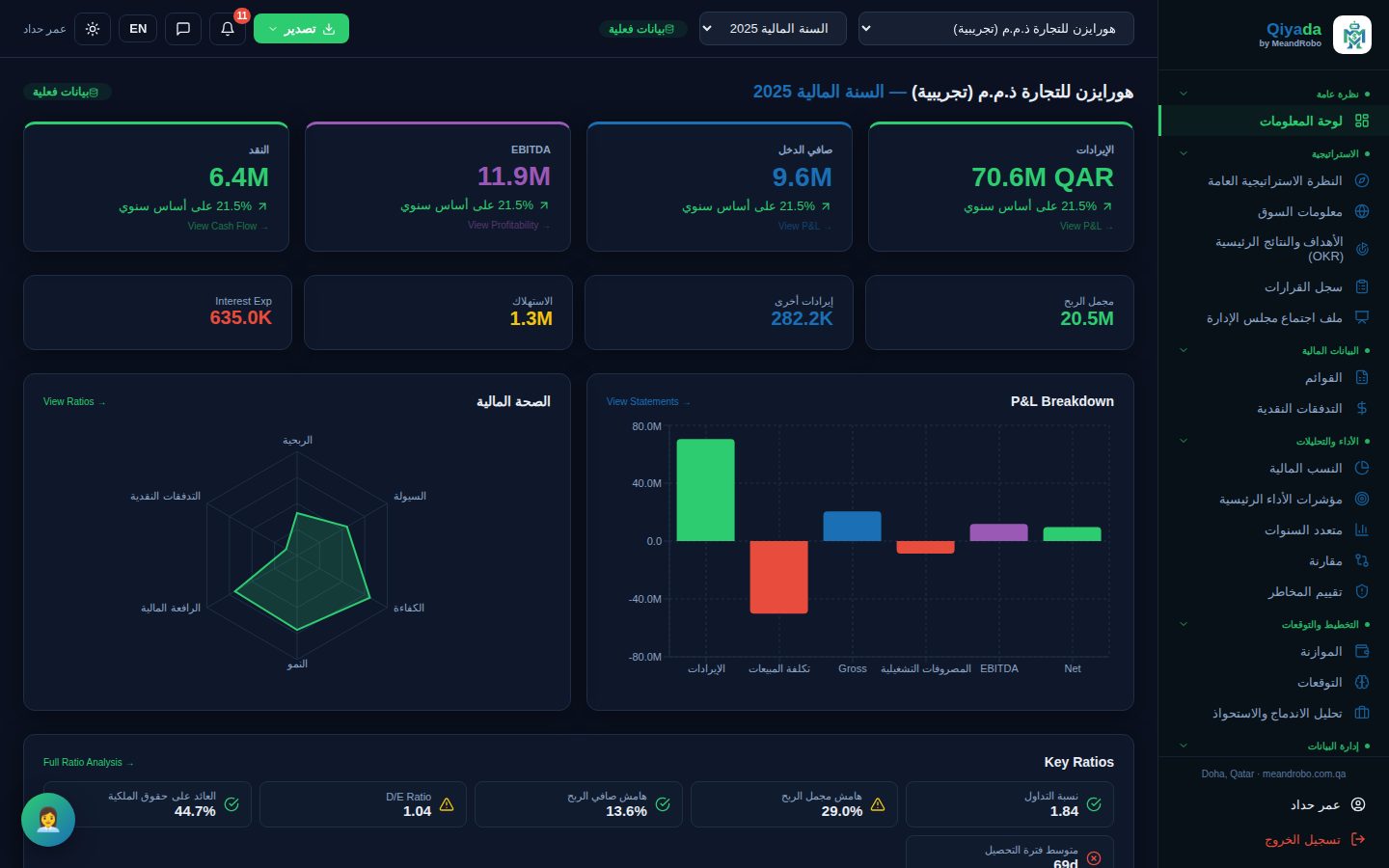
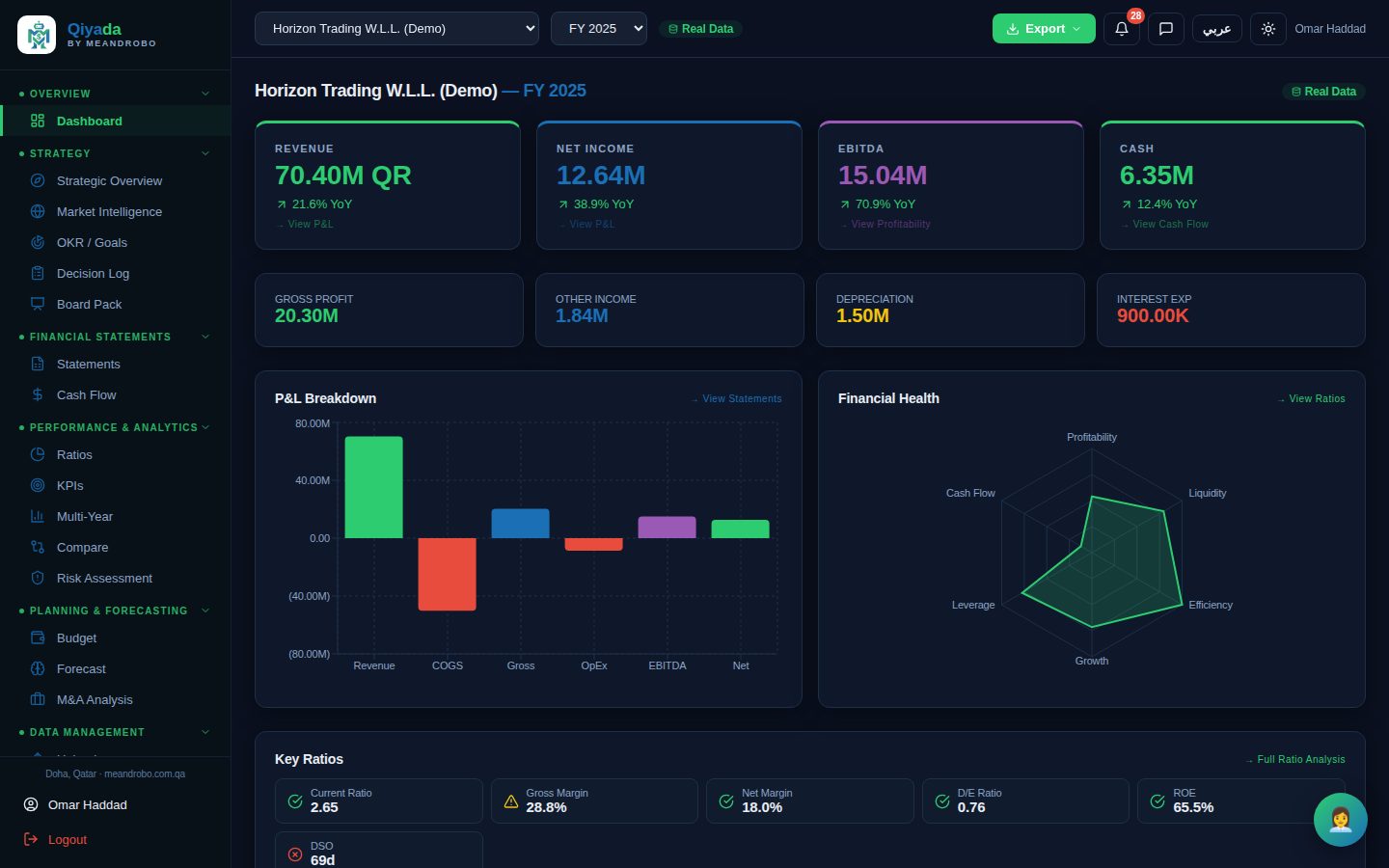
Qiyada executive dashboard with revenue, net income, EBITDA, cash, profit and loss breakdown and financial health radar
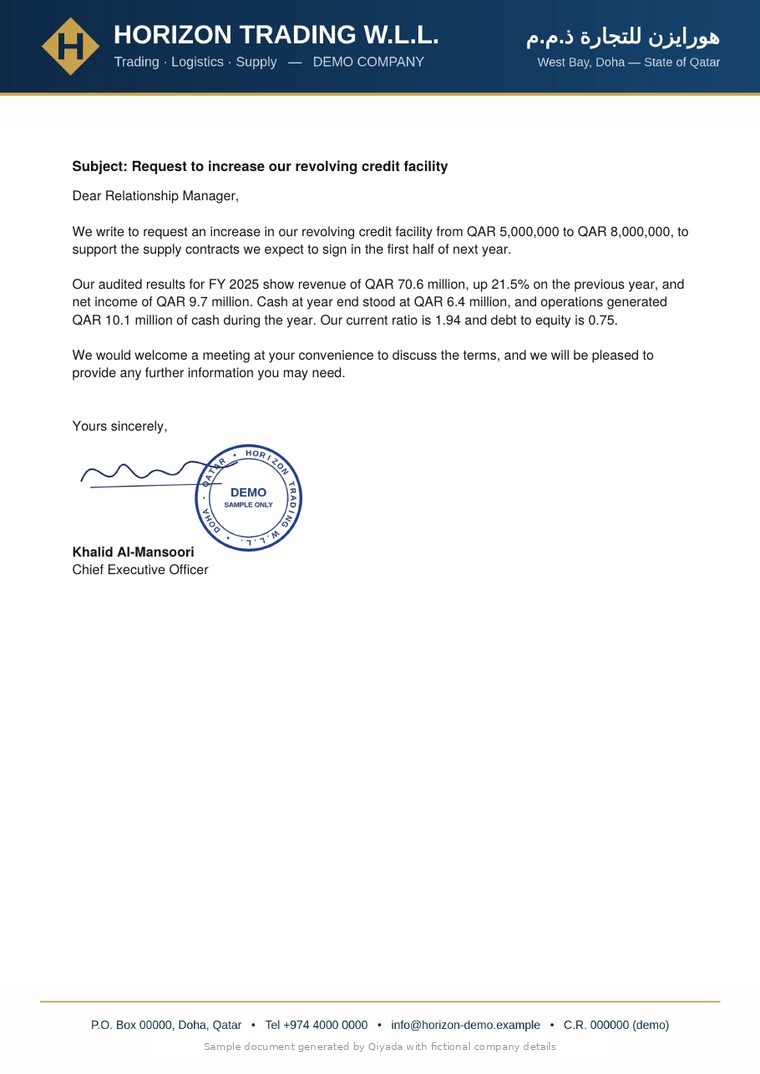
Letter on company letterhead with signature and stamp Board presentation slide with charts
👩‍💼 Mona: “Good morning. Three meetings today, cash is up 56% on last year, and your board pack is ready.”

Every screen and document on this page is produced by the real application, using a fictional demo company.

Who it serves

One platform, every seat at the leadership table.

Each person sees the companies and modules they are allowed to, and gets the information in the form they need it.

🧭

CEO & Chairman

A two-minute picture of every company in the group, what needs attention, and the decisions due for review — spoken by Mona each morning.

📊

CFO & Finance Manager

Statements, ratios, cash flow, forecasts and risk analysed the moment the numbers are uploaded; board packs in PDF, PowerPoint and Excel in minutes.

🏢

Managing Director & General Manager

Performance against goals, contracts reviewed, meetings organised, and letters to banks, clients and authorities drafted on the letterhead.

👥

Department managers & board members

The reports that concern them, delivered as clear documents — with access limited to their own companies and modules.

The problem

You lead the company. The information arrives late, scattered and in the wrong format.

Most leaders we speak to describe the same week.

Q3_final_v7.xlsx bank_recon_OLD.xlsx board_pack_draft3 Day 23 of month 47 unread emails Board meeting in 2h Bank: docs?
⏳
Management accounts arrive weeks after month-endBy the time you see the numbers, the month they describe is history — and so is the chance to act on it.
🧩
The truth lives in a dozen spreadsheetsEvery company in the group, every year, in a different file and format. Nobody can compare them quickly, so nobody does.
❓
Reports say what happened, not what to doA P&L doesn't tell you that receivables are quietly eating your cash, or which decision to revisit.
📅
Your day is scatteredOutlook, Google Calendar, WhatsApp, the bank, the board — and letters in Arabic and English that each take an hour to get right on letterhead.
Why it keeps happening

It isn't your team's fault. It's how the tools were built.

01

Finance teams are small

A mid-sized company has a few people closing the books. Analysis, board packs and forecasts come after the urgent work — which means they come late, or not at all.

02

Accounting software is built for accountants

It records transactions well. It was never designed to brief a CEO in two minutes, compare five companies, or draft the letter to the bank.

03

Generic AI doesn't know your numbers

A public chatbot can't see your statements, can't be trusted with them, and forgets everything tomorrow. Useful analysis needs your data, kept private, in context.

The shift

An executive office that knows your numbers, your documents and your day.

Qiyada does the analysis a senior finance professional would do, the moment the numbers arrive. Mona turns it into your morning briefing, your letter, your email, your next meeting.

📄Statements 📊Ratios & risk 📅Calendar ✉️Email & letters 🔮 Forecast 🏛️ Board pack

Without it

  • Wait for month-end packs, then wait again for questions to be answered
  • Compare companies and years by opening files side by side
  • Discover a cash squeeze when the bank calls
  • Spend the evening drafting letters and chasing your calendar
  • Board pack assembled the night before

With Qiyada

  • Upload the statements; the analysis is ready in minutes
  • Every company, every year, one dashboard — and group totals
  • Risk flags and "what needs your attention" before they become problems
  • Ask Mona by voice; she asks the Qiyada and drafts the reply
  • Board-ready reports on your letterhead, in English or Arabic
How Qiyada works

Four steps. No new accounting system.

Keep the bookkeeping you have. Qiyada works from the statements it already produces, the documents you file in it, and the calendar and mailbox you already use.

1

Upload your statements

Income statement, balance sheet and cash flow — Excel or PDF, one company or the whole group at once with bulk upload. Data-quality checks flag anything that doesn't add up, and you can correct it in the data editor.

2

The agent analyses

Ratios against benchmarks, multi-year trends, cash-flow waterfall, forecasts, risk scoring and market context — calculated for each company and for the group.

3

You ask, Mona and the Qiyada Agent answer

Ask a question in plain language in Ask AI, or tell Mona what you need: the Qiyada Agent (Qiyada's financial analyst) reads your real statements and answers with a report and charts; Mona writes the letter, books the meeting, finds the email.

4

Everything lands in your files

Reports, letters, presentations and email attachments are saved in Files Manager, under each company, on your letterhead with signature and stamp. Open a presentation, edit it in the app and send it — without leaving Qiyada.

Your first dashboard in minutes — from the statements you already have.

Inside the product

What you see when you sign in.

Real screens from Qiyada. Click any screen to enlarge it.

DASHBOARD

The whole company on one screen

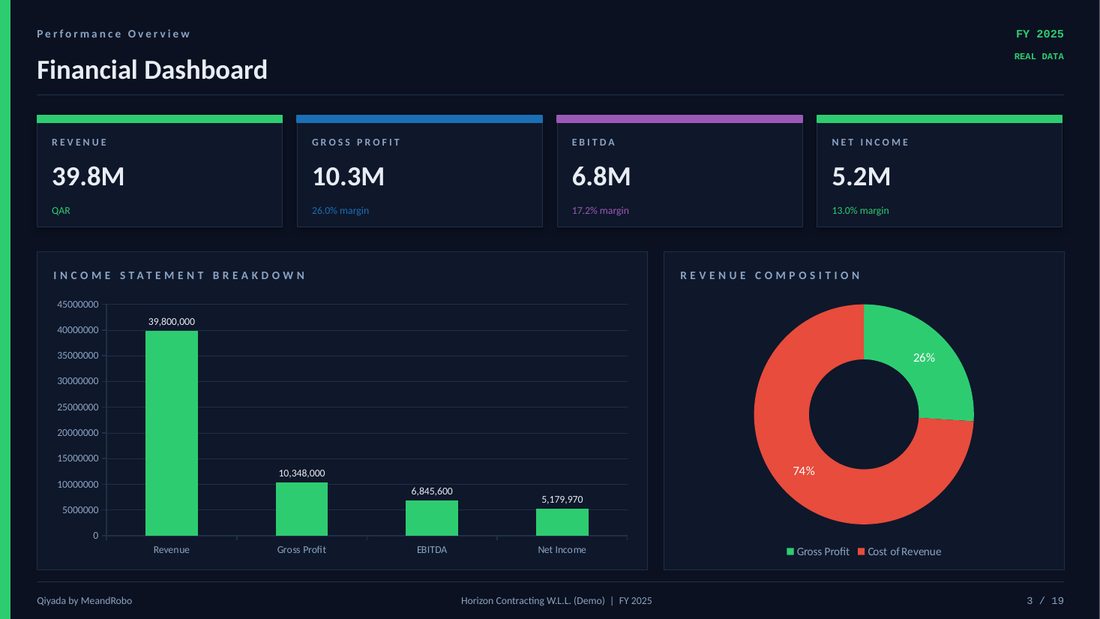
Revenue, profit, EBITDA and cash with year-on-year change, the P&L breakdown, a financial-health radar and the key ratios — each one flagged green, amber or red against its benchmark.

  • Switch company, group or year in one click
  • Every number links to the detail behind it
  • Export to PDF, Excel, Word or PowerPoint
Dashboard
Dashboard
STRATEGY

What needs your attention — before you ask

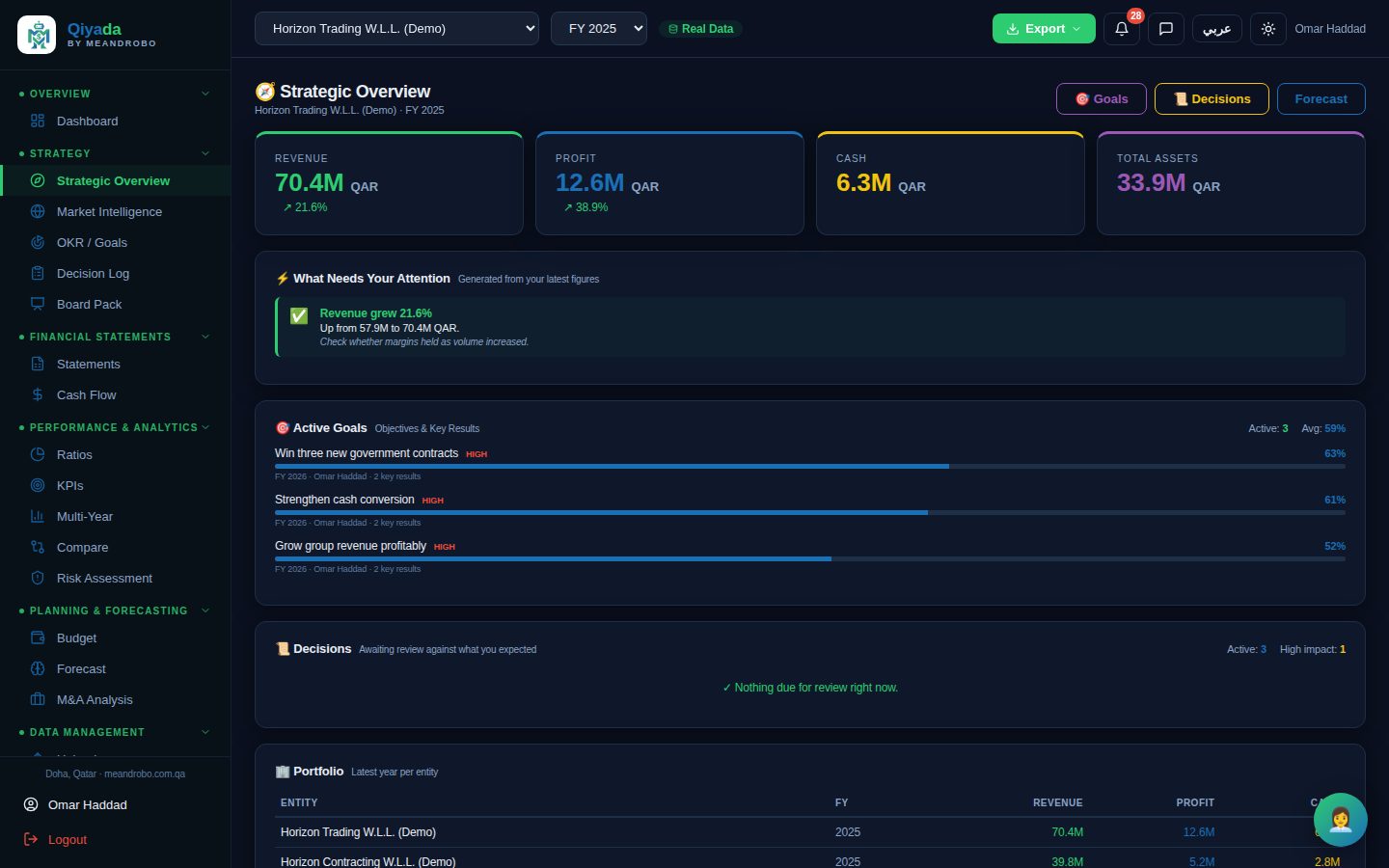
The strategic overview reads your latest figures and tells you what moved and why it matters, next to your goals, the decisions due for review and the whole portfolio side by side.

  • OKRs and goals tracked against the numbers
  • Decision log: record the decision, the expected outcome, and get reminded to check it
  • Board pack assembled from live data, goals and decisions
Strategic Overview
Strategic overview
SECRETARY

Letters, memos and reports on your letterhead

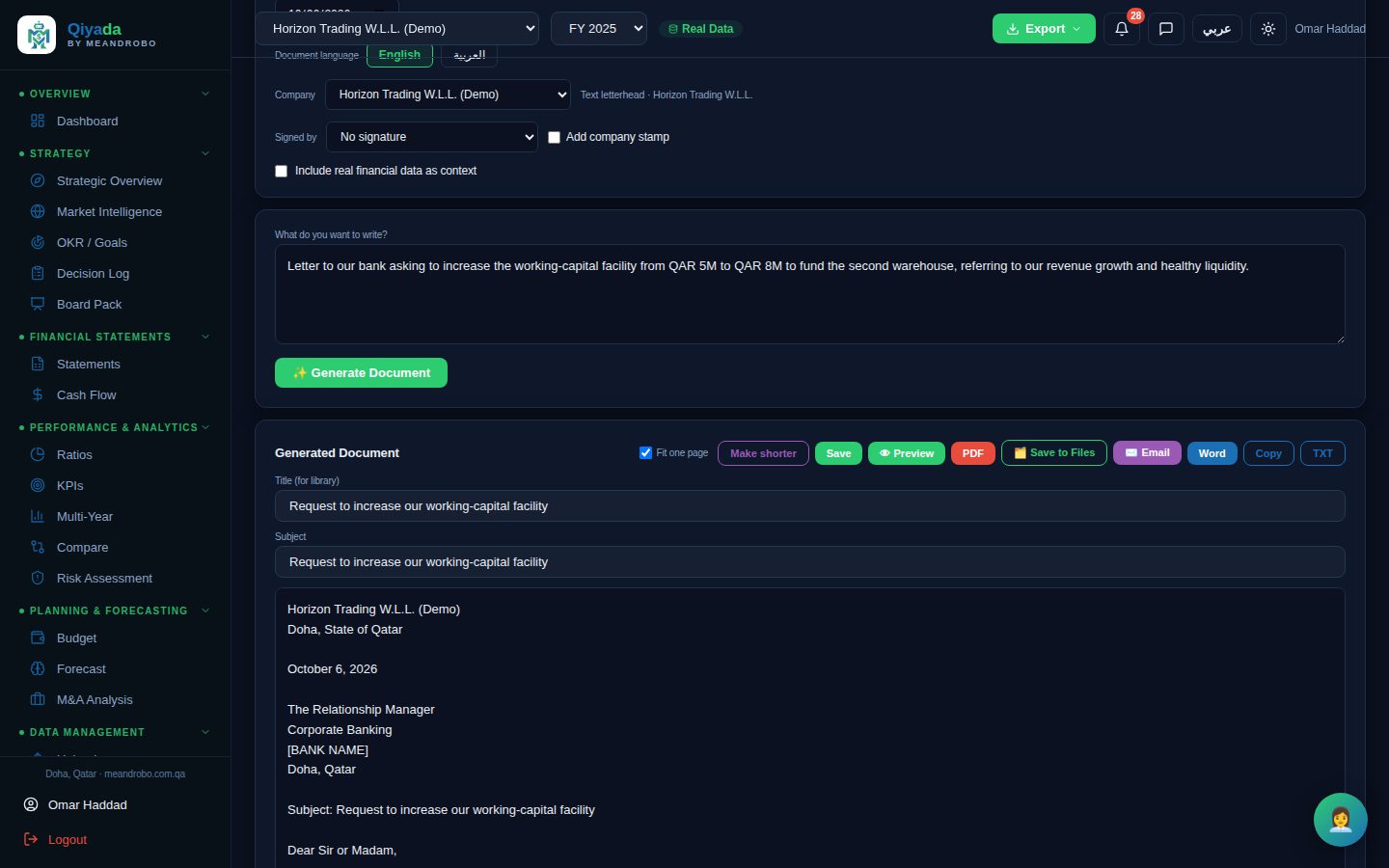
Describe what you need in a sentence. The AI Secretary writes a polished business letter, email, internal memo, business report, board update, meeting minutes or proposal — in English or Arabic — with your company's letterhead, signature and stamp.

  • Optionally draws on the company's real figures
  • Letterhead, logo and footer per company
  • Signatories and company stamps controlled by admins
AI Secretary
AI Secretary
CALENDAR

Your meetings, in the same place as your numbers

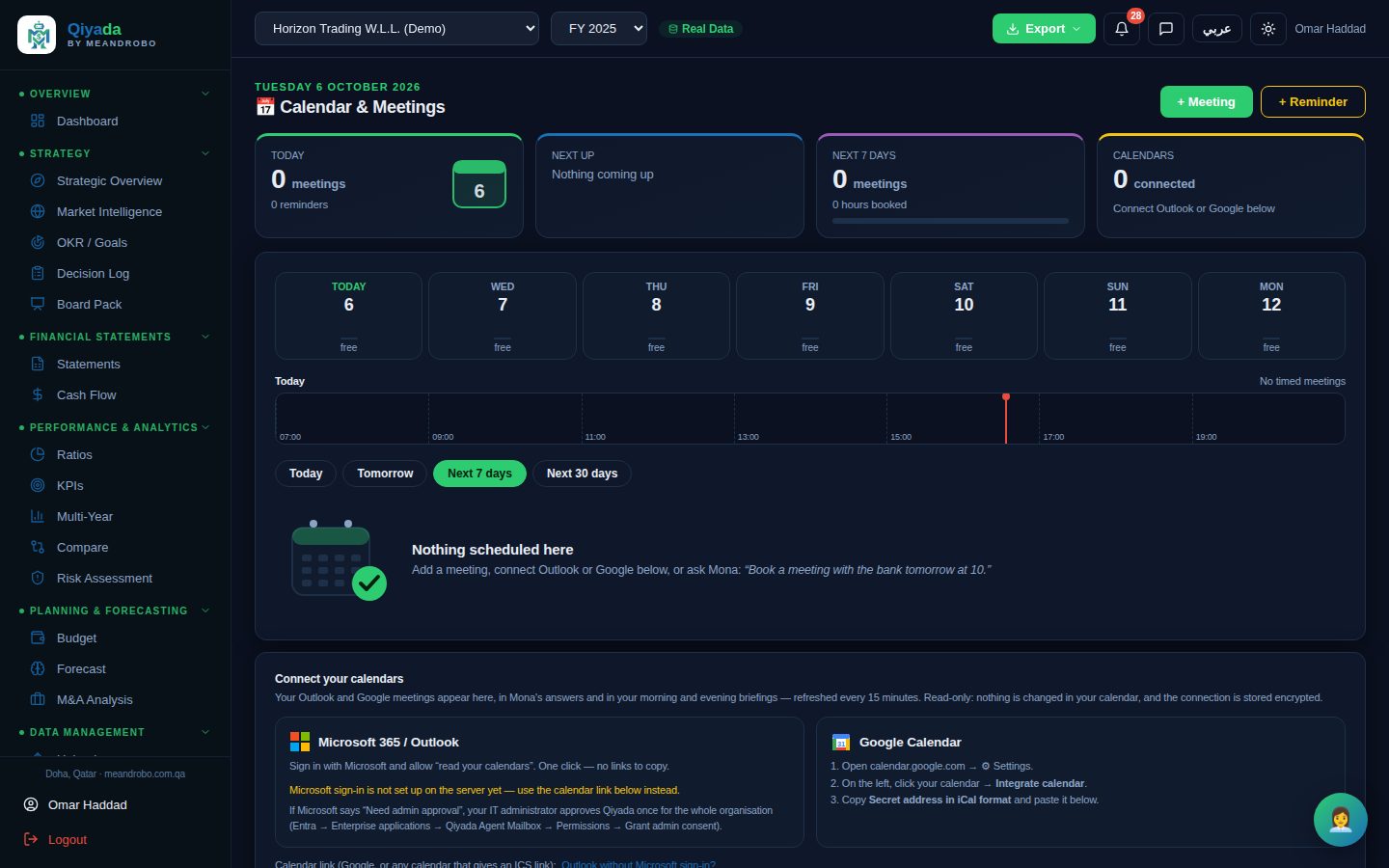
Connect Microsoft 365 / Outlook with one sign-in, or Google Calendar with its private calendar link. Your meetings appear next to reminders you add yourself, and Mona includes them in your morning and evening briefings.

  • Read-only: nothing is ever changed in your calendar
  • Refreshed every 15 minutes
  • Reminders by notification, email or spoken briefing
Calendar & Meetings
Calendar and meetings

More of the analysis

Financial Statements
Financial statements

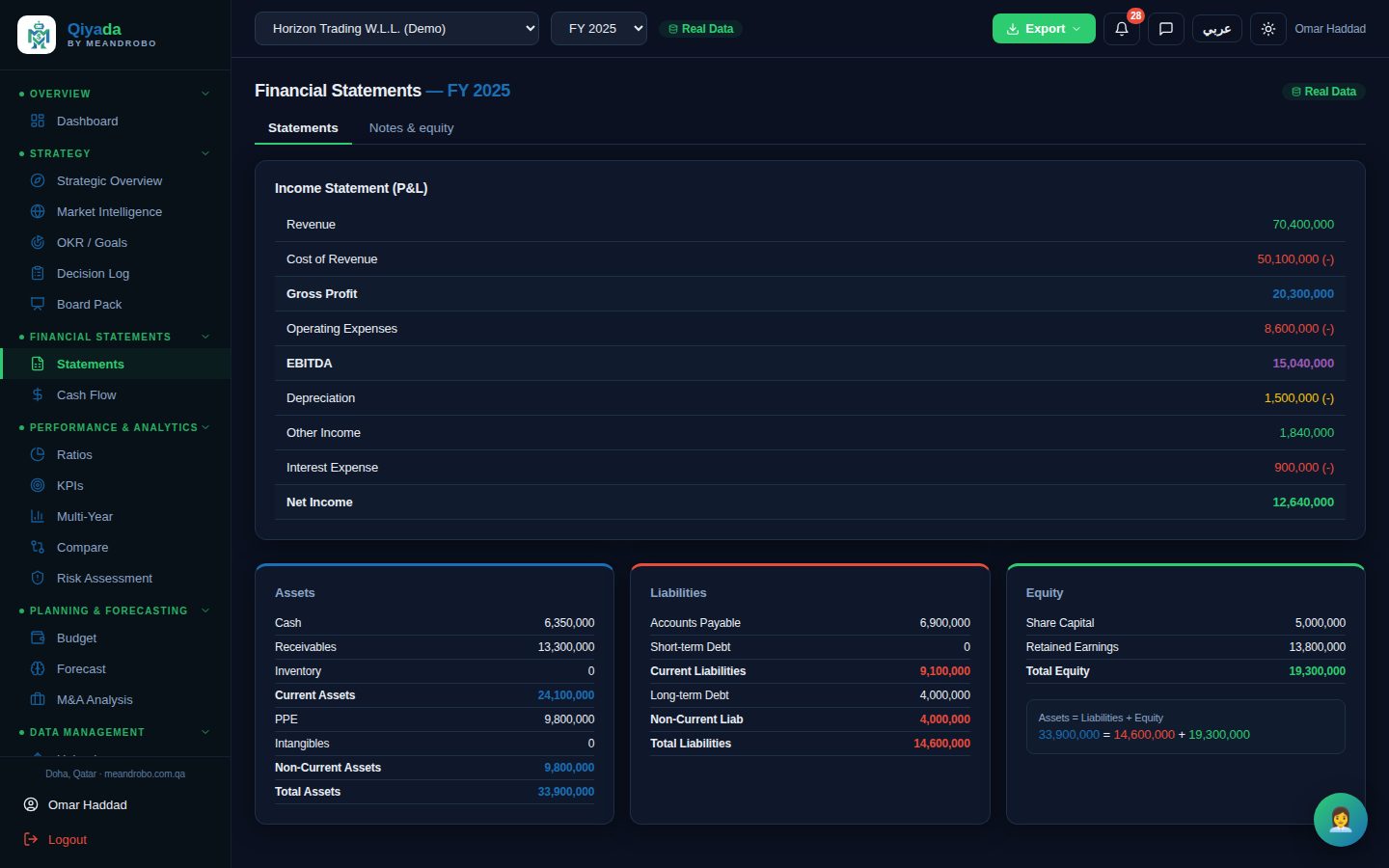
Income statement, balance sheet and equity — cleanly laid out, checked (assets = liabilities + equity) and comparable across years.

Report templates

Board-ready documents, in the formats your people already use.

Press Export or ask Mona. Qiyada produces the finished document — charts, tables, commentary and your branding included. These samples were generated by the application from the demo company.

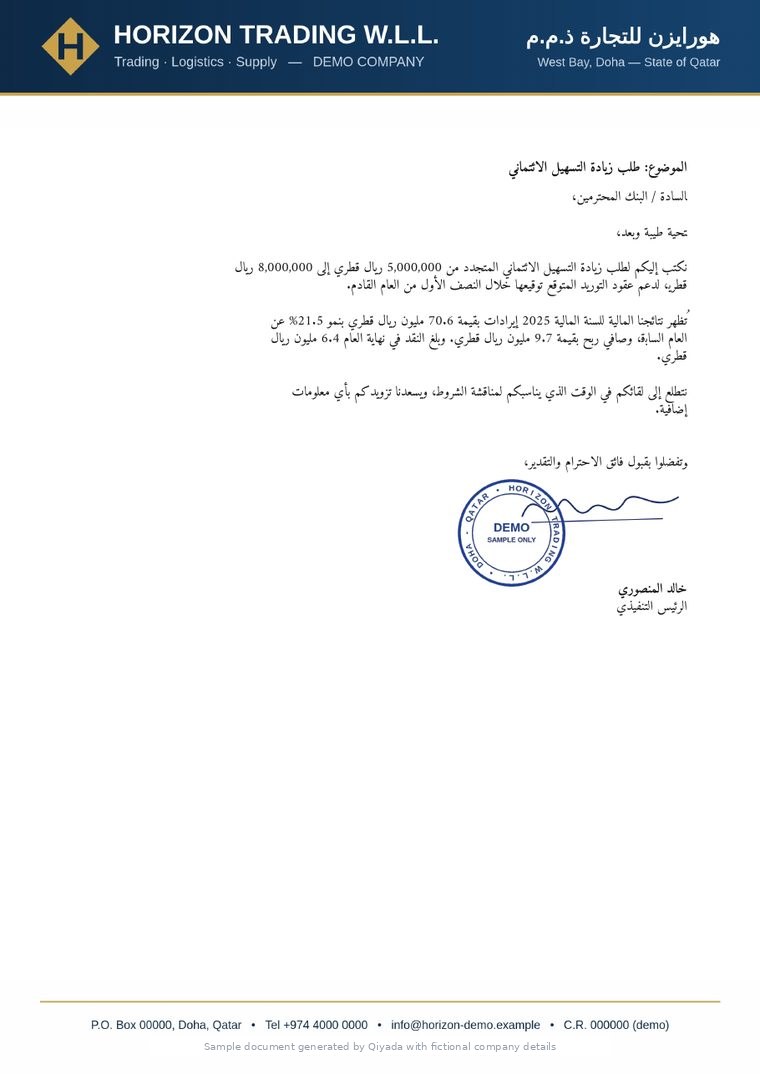
Letters on your letterhead — signed and stamped

Describe the letter in a sentence. The AI Secretary writes it in English or Arabic and lays it out on the company's letterhead, with the authorised signatory's signature and the company stamp.

  • Business letters, emails, memos, board updates, minutes and proposals
  • Letterhead, logo and footer set per company
  • Signatures and stamps controlled by administrators
  • Download as PDF or Word
⬇ Sample letter (PDF)⬇ خطاب نموذجي (PDF)
English letter on company letterhead with signature and company stampArabic letter on company letterhead with signature and company stamp

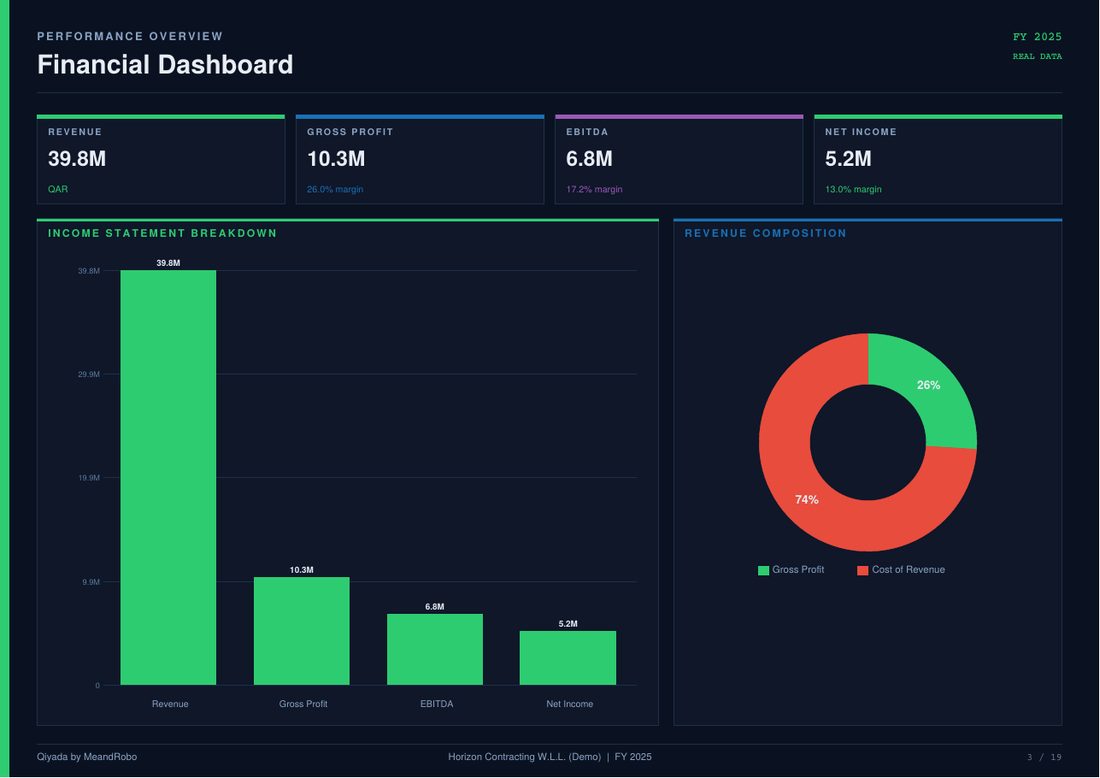
The 19-page board report

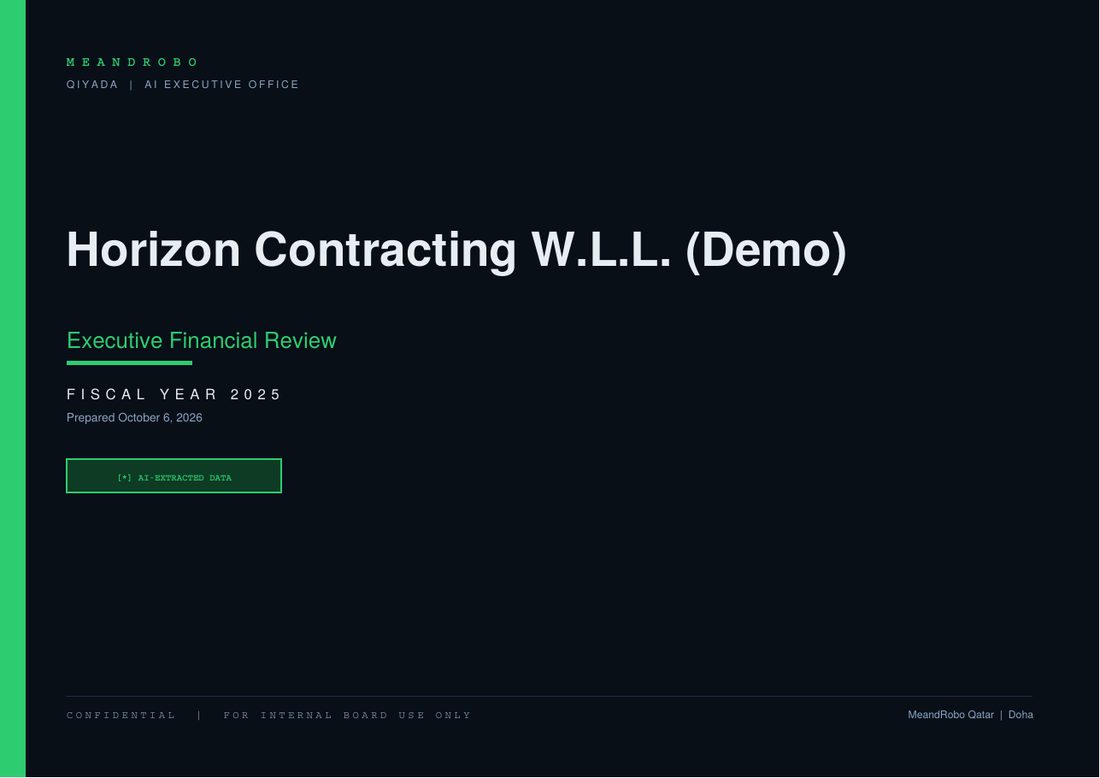
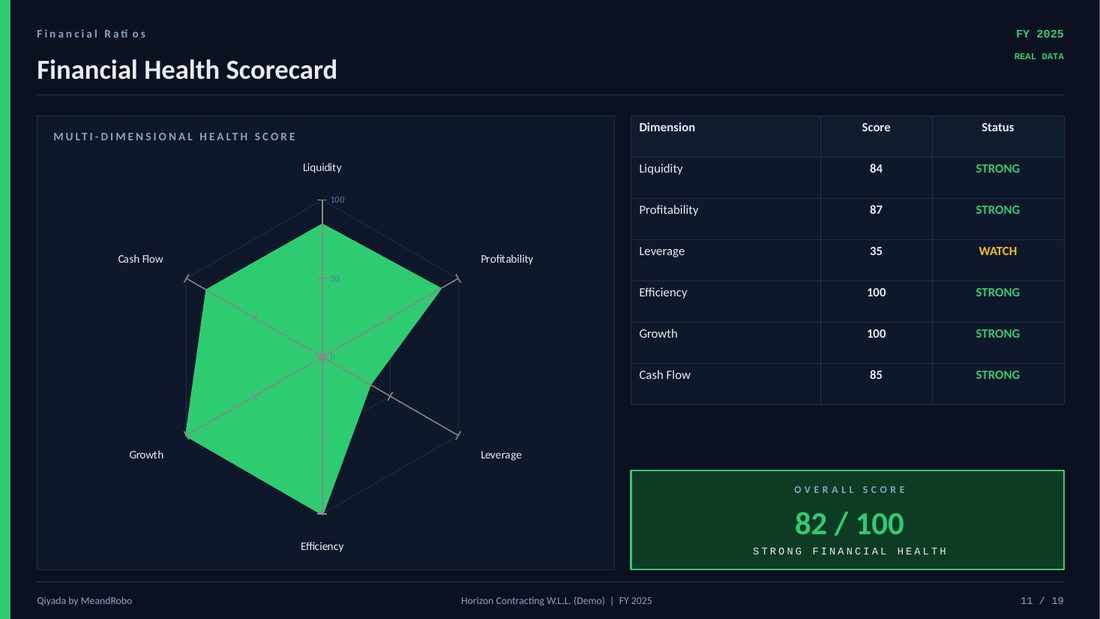
An executive financial review as a PDF: cover, executive summary, dashboard, statements, capital structure, cash flow, every ratio group, health scorecard, multi-year trends, forecast, risks and recommendations.

  • Vector charts that stay sharp when printed
  • Choose the sections, or use a preset
  • Your logo on every page
⬇ Sample board report (PDF)
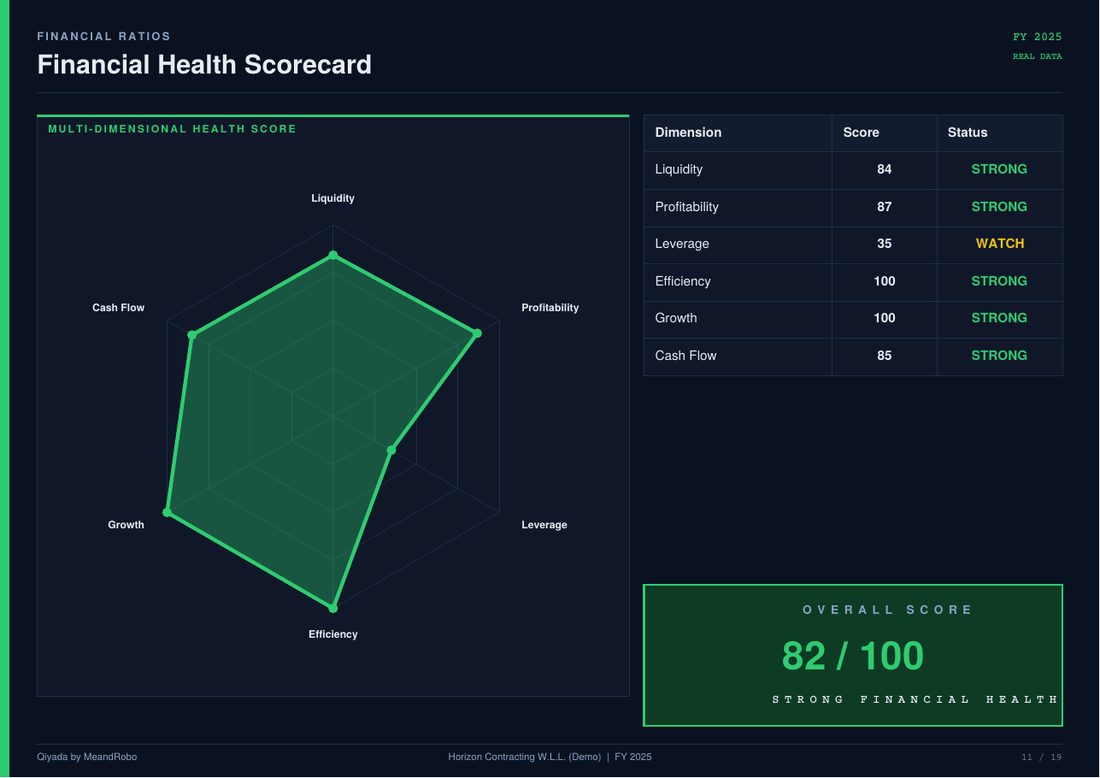
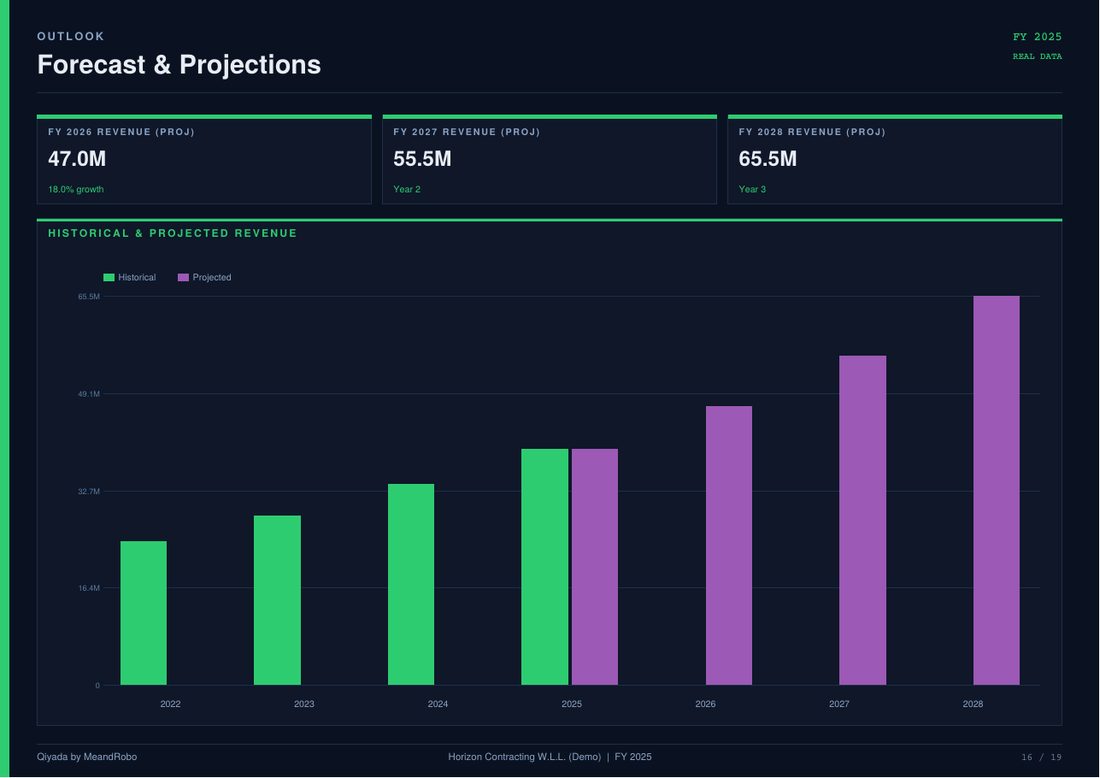
PDF report financial dashboard pagePDF report cover pagePDF report financial health scorecardPDF report forecast and projections

The board presentation, ready to present

The same analysis as an editable PowerPoint deck — native charts and tables your team can adjust before the meeting.

  • Editable PowerPoint charts, not pictures
  • Executive summary, dashboard, cash flow, scorecard, trends, forecast
  • Works in PowerPoint, Keynote and Google Slides
⬇ Sample deck (PowerPoint)
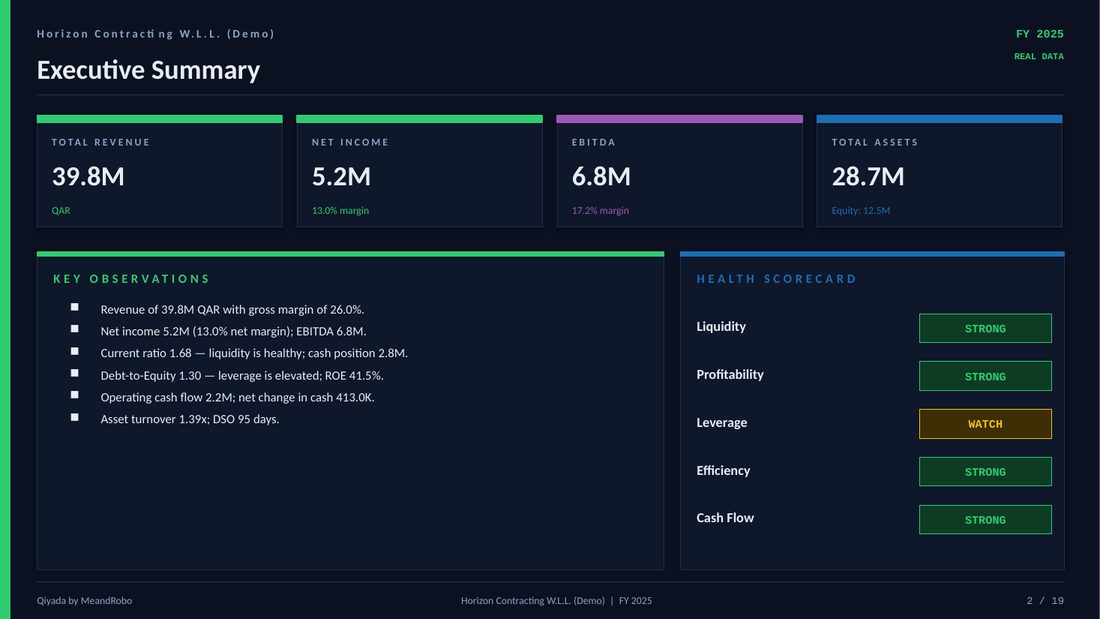
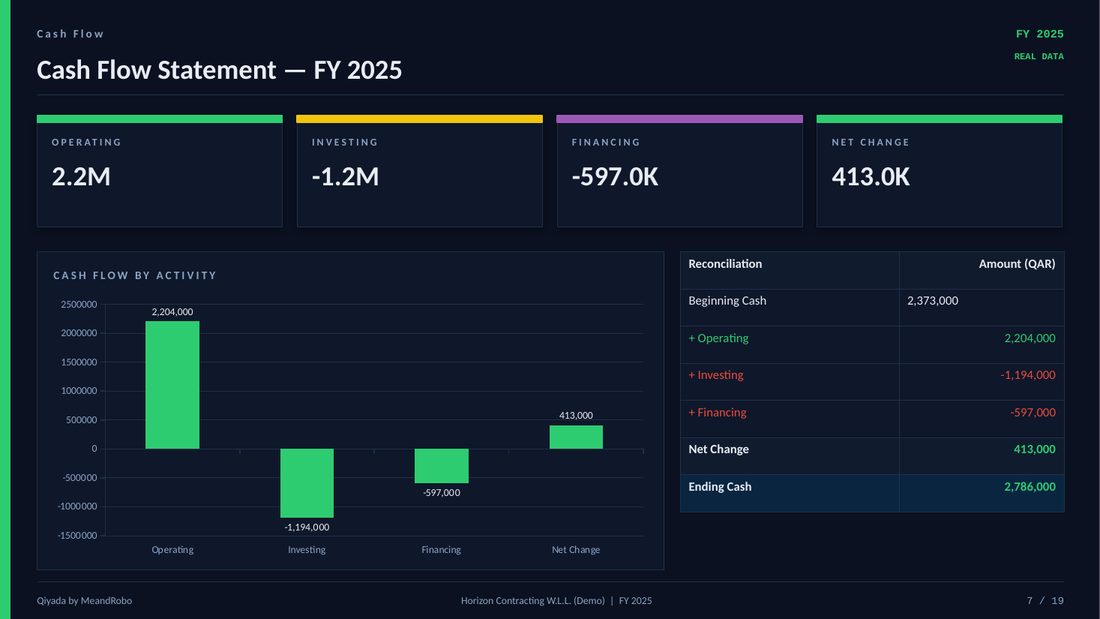
PowerPoint slide: financial dashboard with chartsPowerPoint slide: executive summaryPowerPoint slide: cash flow statementPowerPoint slide: financial health scorecard

The Excel workbook your analysts want

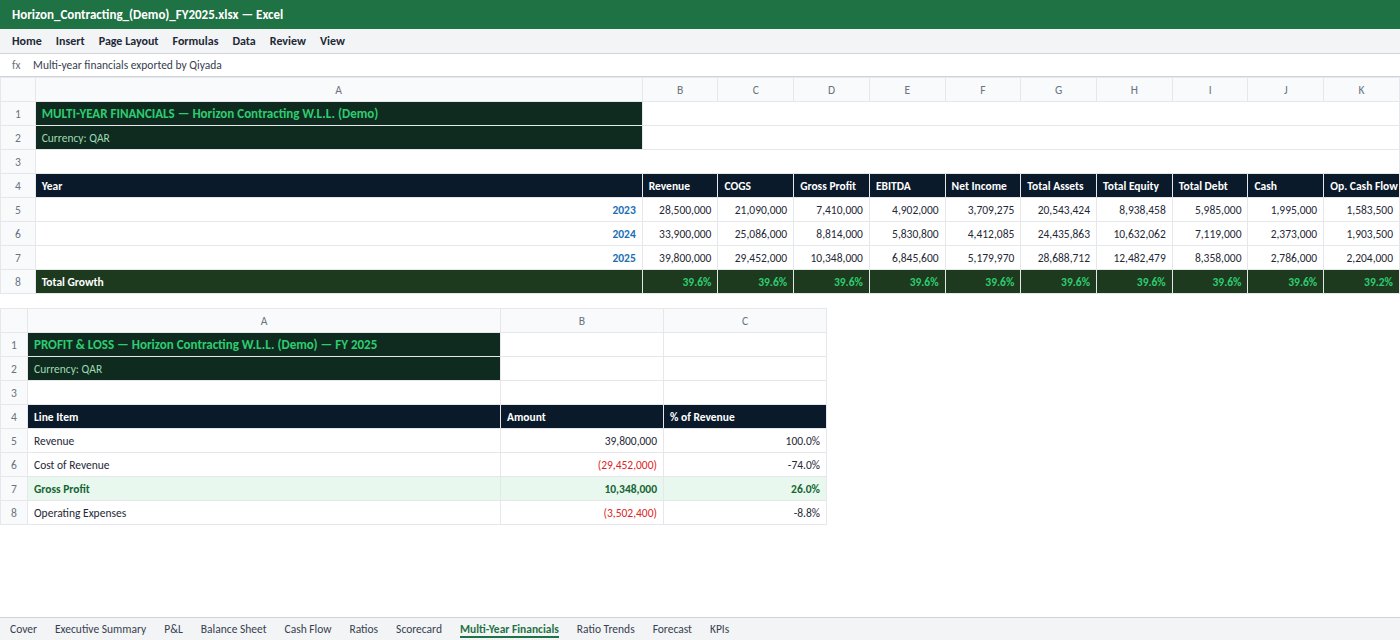
Eleven formatted sheets — cover, executive summary, profit & loss, balance sheet, cash flow, ratios, scorecard, multi-year financials, ratio trends, forecast and KPIs — with real numbers, ready for further modelling.

  • Numbers as numbers, not text
  • Consistent formatting across every sheet
  • Opens in Excel, Numbers and Google Sheets
⬇ Sample workbook (Excel)
Excel workbook with multi-year financials and profit and loss sheets
Your brand on every page

Each company in the group keeps its own identity.

🏷️ Logo & letterheadUpload a letterhead design, or let Qiyada build one from your logo and colours.
✒️ SignaturesAuthorised signatories per company; administrators decide who may sign.
🔵 Company stampsStamps are cleaned from a photo and applied only when you choose.
🌐 Two languagesThe same template in English or Arabic, right to left where it should be.

Board-ready PDF, PowerPoint and Excel reports, on your own letterhead.

Meet Mona · مونا

An AI secretary you can simply talk to.

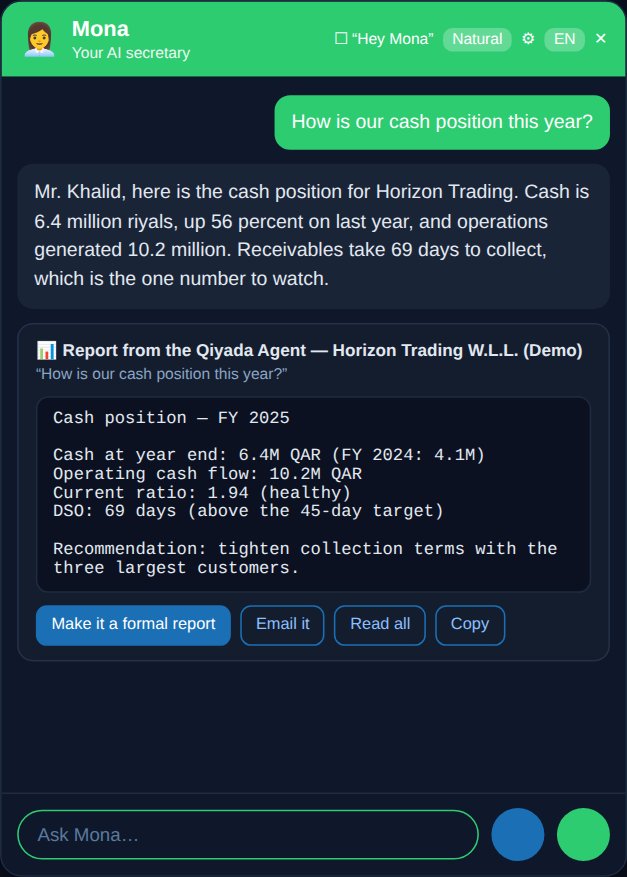
Ask out loud: “How is our cash position this year?” Mona asks the Qiyada, reads back the answer in a natural voice, and offers to turn it into a formal report or an email. Speak or type; you press Send, and anything you ask while she works is queued and answered too.

“Thank you, Mona.” — and the conversation ends.
🧠 Works with the QiyadaReports, risk assessment, market brief, data quality, goals and decisions — on request.
🌅 Morning & evening briefingsToday's meetings, reminders, decisions due and key results — spoken, pushed or emailed.
✉️ Drafts, you approveEmails and letters are prepared for you; nothing is sent until you press Send.
🎙️ 30 natural voicesFemale and male voices, accents, a free browser voice option, and a “Hey Mona” wake word.
🔁 Calm conversationYour words appear first and go only when you press Send — people talking nearby never interrupt her. Several questions are queued and all answered.
🇶🇦 English and ArabicShe answers in the language you speak, and addresses you the way you choose.
Mona
Mona answering a cash question with a report from the Qiyada

Let Mona prepare your day, your letters and your reports.

Everything included

Every module, in one platform.

No add-ons to discover later. This is the full list of what Qiyada does today, and which plan includes it.

Unmarked — every plan, including freePRO Professional and ExecutiveEXEC Executive

📊Overview & statements

  • Dashboard — headline figures, P&L breakdown, health radar, key ratios
  • Financial statements — P&L, balance sheet, equity
  • Cash flow — operating, investing, financing waterfall

🧭Strategy

  • Strategic overviewPRO — what needs your attention, portfolio view
  • Market intelligencePRO — AI market and sector brief
  • OKR / goalsPRO — objectives and key results
  • Decision logPRO — decisions, expected outcomes, review dates
  • Board packPRO — running order, performance, goals, decisions

📈Performance & analytics

  • Ratios — liquidity, profitability, leverage, efficiency vs benchmarks
  • KPIsPRO — the indicators you track
  • Multi-year trends, and competitor comparisonPRO — upload a competitor's statements and see where you stand
  • Risk assessmentPRO — AI risk scoring with recommendations

🔮Planning & modelling

  • Budget and forecastPRO — multi-year projections
  • Financial modelEXEC — revenue & cash-flow forecast, break-even, DCF valuation
  • M&A analysisEXEC — upload a company's documents to value it, with synergies and deal view

🗂️Data management

  • Upload Excel or PDF statements, or many at once with bulk uploadPRO
  • Data qualityPRO — checks that the statements add up
  • Data editor — review and correct any figure
  • Companies, and groupsEXEC with a consolidated view

📜Contracts

  • Contract reviewPRO — upload a PDF, get financial terms and risks flagged
  • Contract generatorEXEC — shareholder, partnership, joint-venture and more

👩‍💼Communications

  • MonaEXEC — voice assistant working with the Qiyada
  • AI SecretaryPRO — letters, memos, reports, minutes, proposals
  • Calendar & meetingsEXEC — Outlook and Google sync, reminders
  • MailboxEXEC — Microsoft 365 and Gmail; urgent-email alerts
  • Business cardsPRO — scan a card, build your contacts

🛡️Administration

  • User management — roles and per-module access
  • Audit log — who did what, and when
  • AI usage — cost per feature and a monthly budget cap
  • Encrypted backups — taken and tested every day

🌐Everywhere

  • English and Arabic — full right-to-left interface
  • Files Manager — every document in folders per company; the AI Secretary, the Qiyada Agent and Mona file their work here and attach it to emails Executive
  • Presentations — decks built by the AI Secretary from your figures and documents, edited in the app (charts, tables, pictures, themes) and saved as PowerPoint Executive
  • Help & Guides — 43 illustrated how-to guides inside the app; ask Mona "how do I…" and she answers from them
  • Ask the Qiyada Agent — chat about any company's numbers
  • Export — PDF on every plan; Excel, Word and PowerPointPRO
  • Installable on phone and desktop as an app
لوحة المعلومات
The dashboard in Arabic, right to left
Arabic, properly

Built for how business is done here.

وكيلك المالي وسكرتيرتك الذكية، بالعربية والإنجليزية.

Switch the whole interface to Arabic, right to left. Generate letters and reports in Arabic on your letterhead, and talk to Mona in Arabic. Amounts in QAR by default, with the other currencies you report in.

Pricing

Start free. Upgrade when your team needs more.

Every plan is a private workspace for your organisation. Cancel any time — you keep your plan until the end of the period you paid for.

Essentials
See your numbers clearly — free.
Free
No card needed
  • 1 user and your own company
  • Dashboard, statements, ratios, cash flow, multi-year trends
  • 30 AI requests a month
  • PDF export (with Qiyada footer)
Start free
Professional
The full analysis and board reporting.
QR 100/ month
≈ $27.50 USD, billed through PayPal
  • 1 user and your own company
  • Compare with up to 2 competitors
  • Budget, forecast, risk, market intelligence
  • OKR, decision log, board pack, data quality
  • PDF, PowerPoint & Excel reports
  • Letters with letterhead, signature & stamp
  • Contract review
  • 300 AI requests a month
Subscribe to Professional
MOST COMPLETE
Executive
Your whole executive office, under your brand.
QR 150/ month
≈ $41.25 USD, billed through PayPal
  • 1 user and your own company — add users for $5 and companies for $10 a month each
  • Everything in Professional
  • Compare with up to 4 competitors
  • M&A: evaluate up to 4 companies from their documents
  • Mona voice assistant, calendar sync, mailbox, briefings
  • Financial model, contract generator, group view
  • Your own logo & colours across the app
  • 1,000 AI requests a month, priority support
Subscribe to Executive
Billed in US dollarsPayPal charges the USD amount shown (QR 100 = $27.50). Prices exclude any taxes that apply.
Renews automaticallyMonthly or yearly, until you cancel. You approve the amount and frequency in PayPal before paying.
Cancel online, any timeIn the app under Plan & Billing, or in PayPal. You keep your plan to the end of the period you paid for.
Nothing is deletedIf you cancel, the workspace returns to the free plan with your data intact. Refund & cancellation policy
Compare every feature, plan by plan +
FeatureEssentials
Free
Professional
QR 100 / month
Executive
QR 150 / month
Limits
Your own company111 + extra at $10 / month each
Users111 + extra at $5 / month each
Competitors to compare with (from their financial statements)—24
Companies to evaluate for M&A (from their documents)——4
AI requests a month303001,000
Financial intelligence
Dashboard, statements, cash flow, ratios✓✓✓
Multi-year trends✓✓✓
Data editor and upload (Excel, PDF)✓✓✓
Ask the Qiyada Agent (chat about your numbers)✓✓✓
Strategic overview, KPIs, competitor comparison—✓✓
Budget and forecast—✓✓
Risk assessment and market intelligence—✓✓
OKR, decision log, board pack—✓✓
Bulk upload and data-quality checks—✓✓
Financial model (break-even, DCF) and M&A analysis——✓
Groups with a consolidated view——✓
Reports and documents
PDF reportsWith Qiyada footer✓✓
PowerPoint and Excel reports—✓✓
AI Secretary: letters on your letterhead with signature and stamp—✓✓
Contract review—✓✓
Contract generator——✓
Business-card scanner and contacts—✓✓
Executive office
Mona voice assistant and daily briefings——✓
Calendar sync (Microsoft 365, Google calendar link)——✓
Mailbox with urgent-email alerts——✓
Your own logo and colours across the app——✓
Security and control — every plan
Two-factor sign-in, audit log, per-company access✓✓✓
Encrypted daily backups✓✓✓
Export all your data, any time✓✓✓
Support
Help by email✓✓✓
Priority support——✓

For businesses only. Need more users or companies? On Executive, add them in the app: $5 a month per extra user and $10 a month per extra company.

Security & control

Your numbers and documents are the most sensitive things you own. We built it that way.

🔐

Two-factor sign-in

Authenticator-app codes with backup codes. Sessions expire, and are stored only as one-way hashes.

🏢

Company-level access

Each user sees only the companies and modules they are given. Checked on every request, including Mona's.

🧾

Full audit log

Sign-ins, changes and administrative actions are recorded with who and when.

💾

Encrypted backups

Backups are encrypted and can be copied off-site automatically. Mailbox and calendar connections are stored encrypted.

✋

You stay in charge

Mona drafts; you send. No email leaves without your confirmation, and calendars are read-only.

💰

AI cost under control

Every AI call is logged by feature, with a monthly budget you set.

🧱

Private by design

A dedicated application for your organisation — not a public chatbot. Your data is sent to the AI model only to produce the analysis you ask for.

🔑

Roles and permissions

Admins decide who can manage users, groups, signatories and company stamps.

Private by design: two-factor sign-in, access per company, encrypted backups.

Your data, your rules

Clear promises, written into our terms.

What we will and won't do with your company's information — not marketing language, but commitments in the documents you accept.

🚫

Never used to train AI

Your statements, documents and conversations are not used to train any AI model — ours or our AI provider's. We use only paid AI services that don't train on customer data.

📦

Take everything with you

Export your whole workspace — every record, plus the logos, stamps and images stored in it — in open formats, any time, free of charge. No lock-in and no exit fees.

🗑️

Deleted when you leave

Close your workspace and you get 30 days to export. Then it is permanently deleted, and backups roll over within 60 days.

✋

A person presses Send

AI drafts; you decide. Nothing is emailed or sent on your behalf without a user's confirmation, and Qiyada never moves money.

🤖

AI is labelled as AI

Mona tells you she is an AI assistant. AI output can be wrong, so reports are marked for your review — they are not audited figures or professional advice.

🌍

Written for the Gulf and beyond

Our privacy terms follow Qatar's data protection law and are designed to meet GCC, EU and UK requirements, with a data processing addendum for your compliance team.

Straight answers

Is it right for you?

Built for

  • CEOs, owners, managing directors and general managers who want the full picture without waiting for it
  • CFOs and finance managers who want analysis, board reports and decks done in minutes, not days
  • Groups with several companies that need one view — and each company's own letterhead
  • Leaders who work in both English and Arabic

Probably not for you if

  • You don't yet produce an income statement and balance sheet — start with bookkeeping first
  • You need a tool for your accountants to post transactions
  • You want an AI that acts on its own without your approval

What Qiyada is not

  • Not an accounting system or ERP — it reads the statements yours produces
  • Not an auditor — it doesn't certify your accounts
  • Not a payments tool — it never moves money
  • Not a replacement for your finance team's judgement — it gives them their time back

Professional is QR 100 a month, Executive QR 150 — cancel any time.

What we're building next

The platform keeps growing.

Planned work, in development now. We don't promise dates — tell us in the demo which one matters most to you.

Planned

Google Calendar one-click sign-in

Connect Google the same way as Microsoft today, without copying a calendar link.

Planned

Direct accounting-system connections

Statements flowing in automatically from your accounting software, instead of uploading files.

Planned

Mona on more channels

Briefings and quick answers where you already are, not only inside the app.

Questions

What leaders ask us first.

What happened to CFO Agent?

It became Qiyada. The product outgrew its name — CEOs, managing directors and general managers use it as much as finance teams — so in October 2026 it was renamed Qiyada (قيادة, "leadership"). The financial analyst inside the app is now the Qiyada Agent. Old links to cfo.meandrobo.com.qa redirect to qiyada.meandrobo.com.qa, and nothing changes in your workspace or subscription.

Do I have to change my accounting software?

No. Qiyada works from the financial statements your current system or accountant already produces — upload them as Excel or PDF.

How long until I see something useful?

Once a company's statements are uploaded, the dashboard, ratios, trends and cash-flow views are calculated straight away. AI reports and risk assessments take seconds to a minute.

Can it handle a group of companies?

Yes, on the Executive plan. Add each company (USD 10 a month per extra company), put them in a group, and compare them side by side or view the group together.

Does Mona send emails by herself?

Never. Mona prepares the email or letter; you read it, change it if you like, and press Send. Calendars are connected read-only.

Does it work in Arabic?

Yes — the interface, the documents the AI Secretary writes, and conversations with Mona.

Who can see our numbers?

Only the users you add, and only for the companies and modules you allow. Two-factor sign-in, audit log and encrypted backups are built in.

What reports and documents can it produce?

A 19-page board report as PDF, an editable PowerPoint board deck, an 11-sheet Excel workbook, and business letters, emails, memos, board updates, meeting minutes and proposals in English or Arabic — on your letterhead with signature and stamp.

Is it only for the finance team?

No. CEOs, managing directors, general managers, department managers and board members use it for reports, documents, contracts, meetings and briefings. Each user sees only the companies and modules they are given.

Can documents carry our own branding?

Yes. Each company has its own letterhead, logo, footer, authorised signatories and company stamp, used on every letter and report.

What does it cost?

Every plan includes 1 user and your own company. Essentials is free. Professional is QR 100 a month and adds comparison with up to 2 competitors. Executive is QR 150 a month, with up to 4 competitors, evaluation of up to 4 companies you may acquire (from their documents), Mona and your own branding; on Executive you can add users for $5 and companies for $10 a month each. Yearly plans give two months free: QR 1,000 and QR 1,500. PayPal charges in US dollars — $27.50 or $41.25 a month, $275 or $412.50 a year.

How do I cancel, and do I get a refund?

Cancel online at any time — in the app under Plan & Billing, or in your PayPal account. You keep your paid plan until the end of the period you paid for, then the workspace moves to the free plan with your data intact. Part-used periods are not refunded; billing errors always are. The details are in our Refund & Cancellation Policy.

Do you use our data to train AI?

No. Your data is used only to provide the service to you. We don't train AI models on it, and we use only paid AI services whose terms don't allow the provider to train on it either.

Can we export or delete our data?

Yes. An administrator can export the whole workspace — every record, plus the images stored in it — at any time. Closing the workspace gives you 30 days to export, after which everything is permanently deleted.

Is it for individuals?

No — Qiyada is for businesses and the people who run them. Every workspace belongs to an organisation, and users must be 18 or over.

Can I try it before paying?

Yes. Create a free Essentials workspace in a minute, with no card needed, and upgrade from Plan & Billing when you are ready. You can also request a guided demo.
See your own company through Qiyada.

A 30-minute guided demo. Bring last year's statements if you'd like to see them analysed live — or use our sample company. You decide what to share.

Start freeSubscribe